VedronERP · Content
Post Library & Filtering
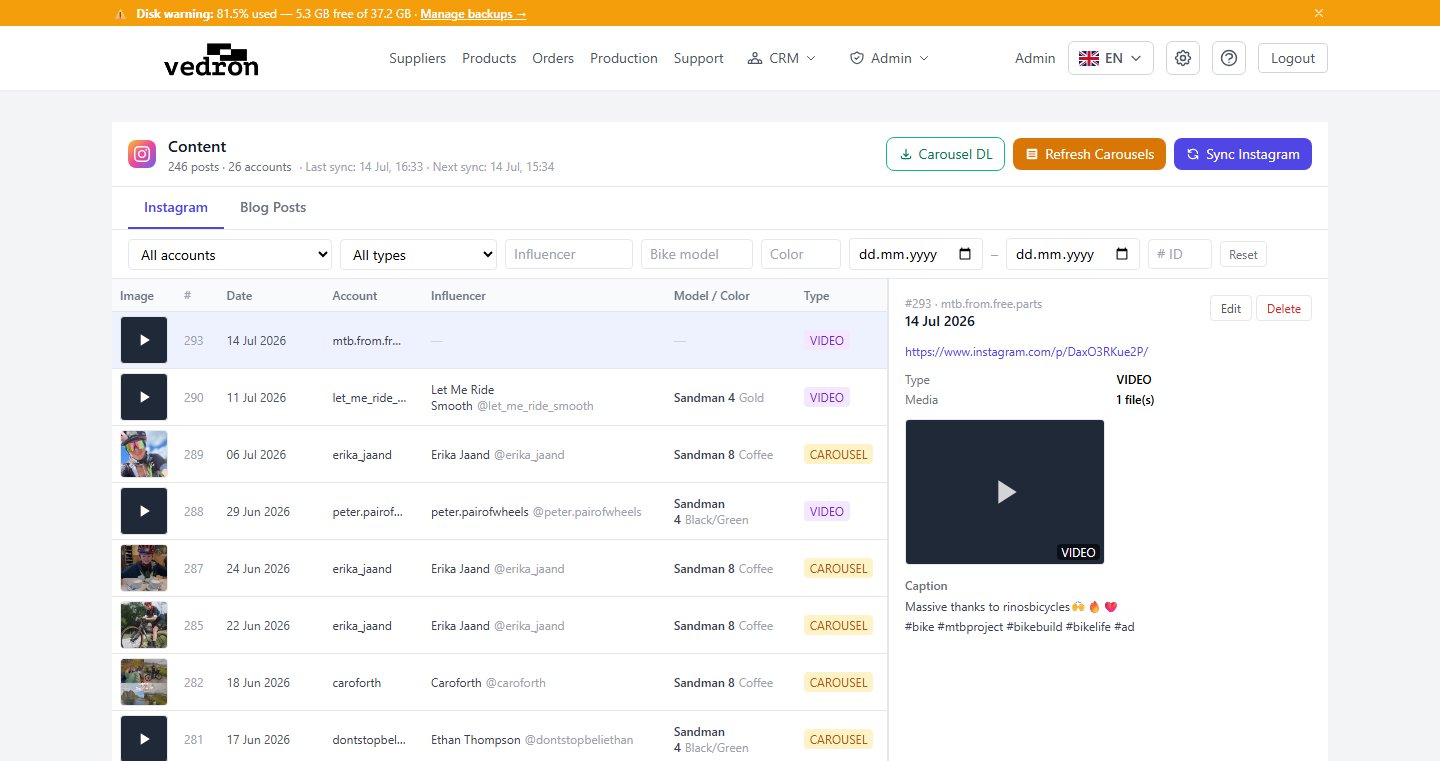
The post library shows all Instagram posts synced from your connected accounts. Each post card displays the media thumbnail, caption, post date, likes, account name, and any tags (product, influencer).
Filtering Posts
- Account and type — use the first two drop-downs ("All accounts", "All types") to narrow by Instagram account or post type.
- Influencer — filter posts of a specific person.
- Bike model and Color — filter posts showing a particular model or color.
- Post shortcode or # ID — jump straight to one post. Click "Reset" to clear all filters.
Editing Post Metadata
- Click a post row to open its details on the right.
- Click "Edit" and change Influencer Name, Influencer Handle, Bike Model, Bike Color, Notes or Repost / Collab.
- Click Save — changes are stored in the ERP (not pushed back to Instagram).
Media Storage
Post images and carousel slides are downloaded and stored on Cloudflare R2 object storage. This means media remains accessible even if the original Instagram post is deleted or the account is disconnected.
Tip: Click "Sync Instagram" at the top of the Content page to import new posts from your connected accounts.